Select a channel and shape your offer.
Compare where buyers already gather, buy or seek trusted help. Check fit, access, demand, economics, incentives and constraints, then shape a supported offer.
DRIVE REVENUE IN 90 DAYS

We provide resources to help you drive revenue growth for yourself and/or your business by helping you identify your unique capabilities, productize that for sale, find new customer prospects for you, then schedule calls on your calendar. We're offering an approximately 75-page, step-by-step PDF with an OpenAI Codex plugin now live so you can chat with it and have it take action for you in real-time in your favorite AI app.
The standalone PDF is available for $195 USD once. Early macOS plugin beta: Codex CLI and Python 3.10+ required, using your own Codex account. The ZIP is not a standalone Mac app.
You get a ZIP that adds Growth tools to Codex CLI. It is not a standalone Mac app. Downloading does not install or start it.
Unzip it and follow the installation instructions in Terminal. Then start a new Codex CLI session, sign in with your own OpenAI account and use the two starter prompts in the instructions. They check setup and help you turn a task you know well into an offer.
Saving workbooks on your Mac is optional. The beta prepares drafts and proposed call times. It does not send messages, book calls or keep working in the background.
Compare where buyers already gather, buy or seek trusted help. Check fit, access, demand, economics, incentives and constraints, then shape a supported offer.
Use the selected channel and an exact dated buying signal to identify one specific value-creation outcome, approved proof and a concrete next step.
Plan the next conversation and propose suitable times. The beta can propose call times from information you supply. Calendar access and any real invitation use your host’s connected tools and require your approval.
INSIDE THE PDF
83 pages · 13 steps · 9 worksheets · 15 diagrams
Choose a distribution channel first, then work through your capabilities, shape an offer, identify prospects, prepare pitches and plan customer calls. Worksheets, a worked example and a 90-day plan help you turn the steps into a repeatable process.
The PDF is designed for manual use. The separate OpenAI Codex plugin beta guides the process in chat and keeps outreach and call times as drafts. Actual search, sending and booking require your existing authorized host tools. Neither the PDF nor the beta guarantees customers, sales or revenue.
THREE PAGES FROM THE FINAL EDITION
Open a page at full size to read it. These samples are page images; the full PDF stays protected.
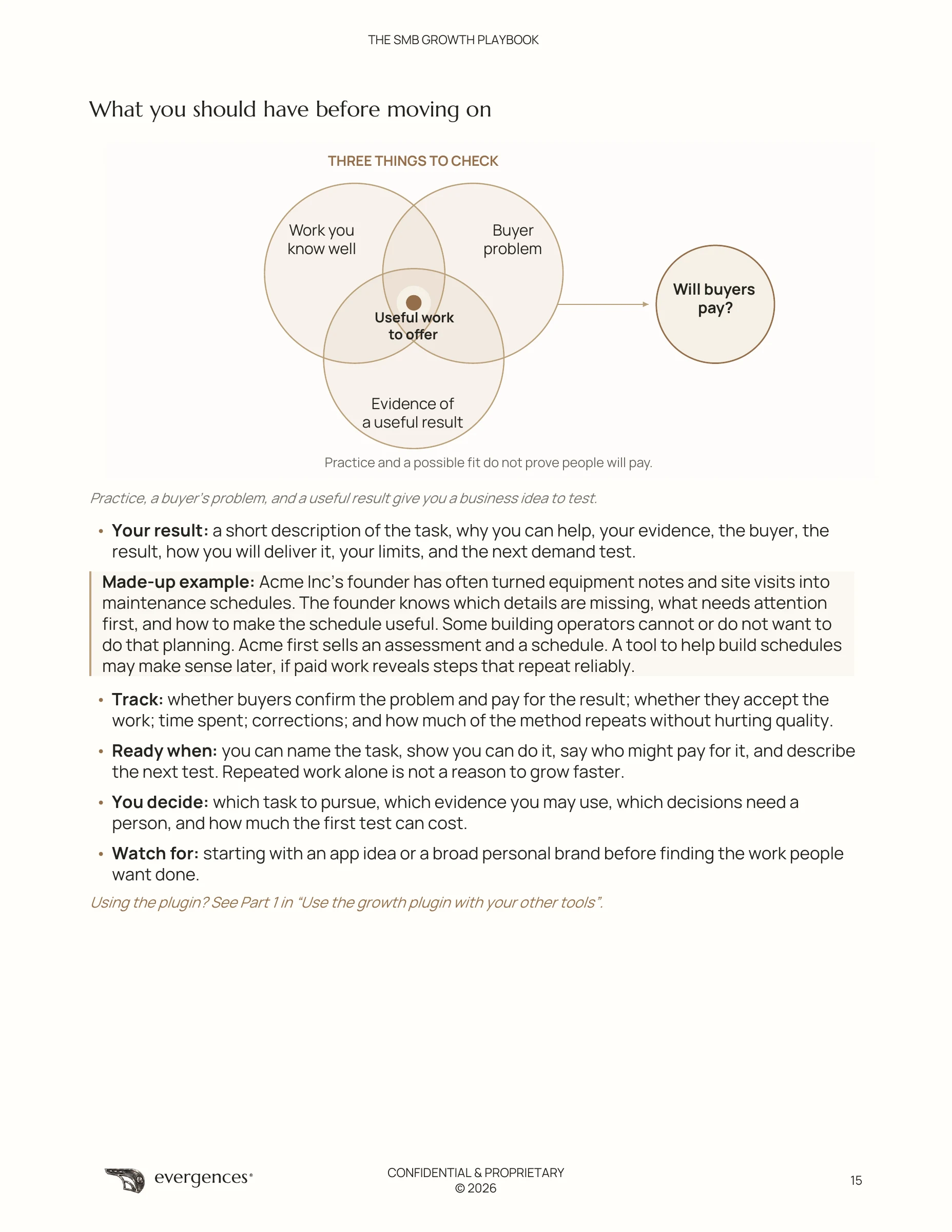
PAGE 15 / FINAL EDITION
Start with work you know well, a buyer’s problem and evidence of a useful result. Then test whether someone will pay.
Read sample page 15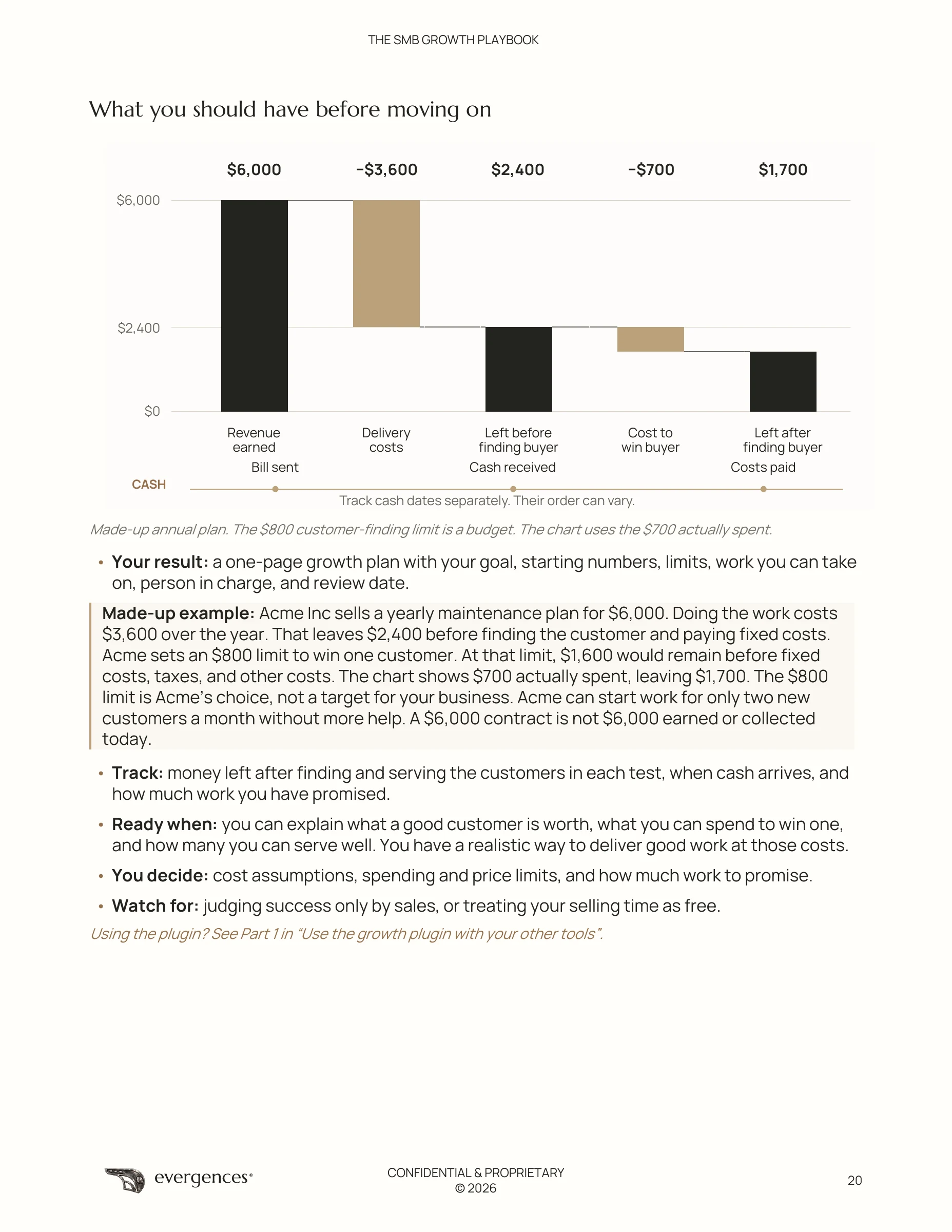
PAGE 20 / FINAL EDITION
Follow a made-up annual plan from revenue through delivery and customer-finding costs, and track when cash arrives.
Read sample page 20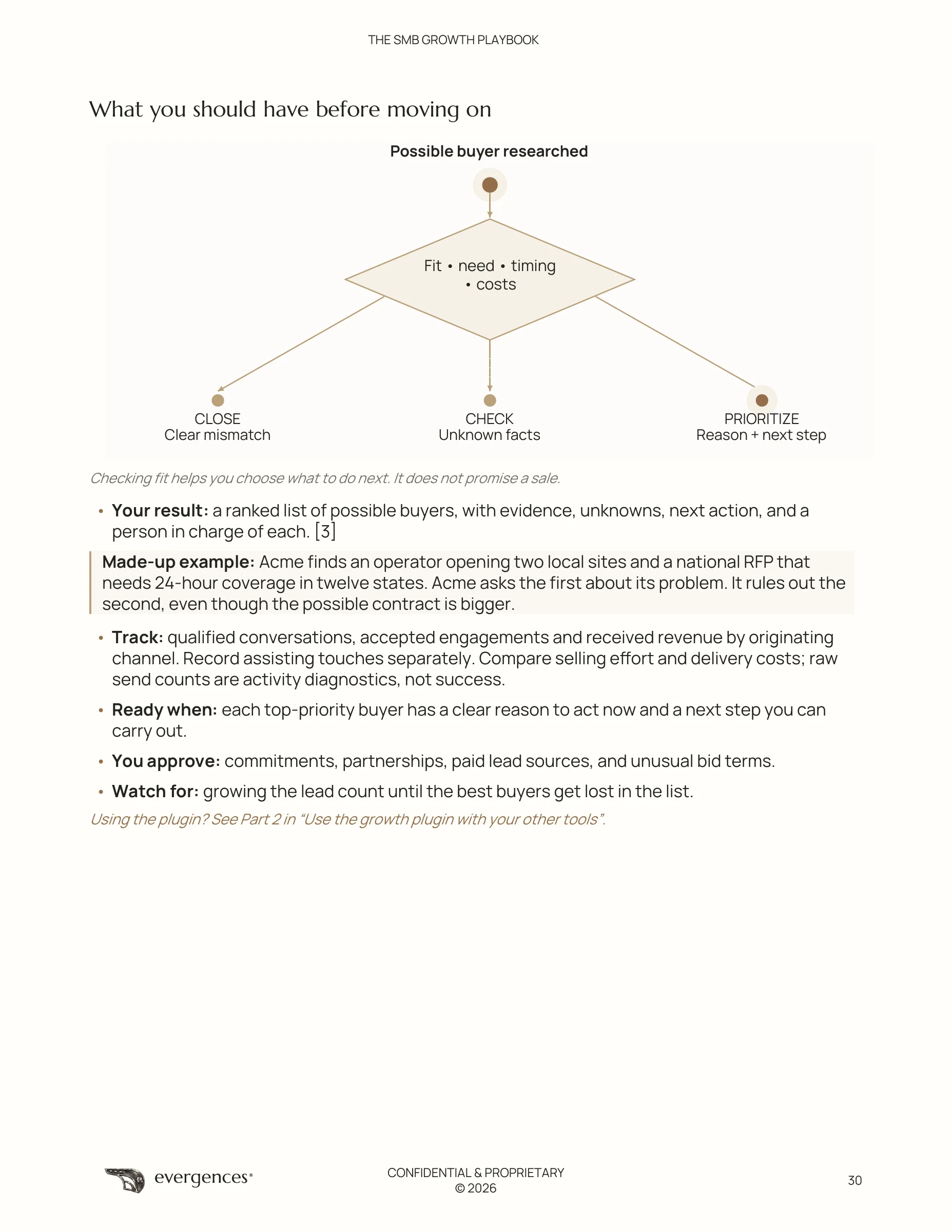
PAGE 30 / FINAL EDITION
Use fit, need, timing and costs to decide which buyers to prioritize, which facts to check and which opportunities to close.
Read sample page 30PRICING / STANDALONE PDF
A standalone purchase of the step-by-step PDF. Plugin access is separate and is not included.
The OpenAI Codex plugin will be offered separately once usable access is approved and available. No plugin subscription is offered here yet.
Buy the PDF securely with Stripe, then download it after payment is verified. No plugin subscription starts from this purchase.
| Section | Page |
|---|---|
| Choose a route to the right buyers | 5 |
| Pause and think | 6 |
| Build a business around useful work | 7 |
| How to use this book | 8 |
| Three parts of the same job | 9 |
| Step 1 Select a distribution channel | 10 |
| Compare the routes to market | 11 |
| Worksheet I Choose and test a distribution channel | 12 |
| Step 2 Find what practice has taught you | 14 |
| Worksheet A Find the work you know well | 16 |
| Choose how to deliver the work | 18 |
| Step 3 Decide what you can afford | 19 |
| Step 4 Make a clear offer you can back up | 21 |
| Worksheet B Set your growth plan and limits | 23 |
| Worksheet C Describe your offer and proof | 24 |
| Step 5 Choose who to help and why now | 25 |
| Step 6 Check what you know and what you may use | 27 |
| Step 7 Find buyers who fit | 29 |
| Worksheet D Check a possible buyer | 31 |
| Step 8 Write a message that matters to them | 33 |
| Step 9 Get approval and send the checked message | 35 |
| Check before you send | 37 |
| Step 10 Handle replies and arrange the call | 38 |
| Book the call Turn an interested reply into a checked calendar event | 40 |
| Book the call Check interest people and time limits | 41 |
| Book the call What to do when booking gets stuck | 44 |
| Worksheet H Arrange the call and pass on the details | 45 |
| Example Acme Inc arranges the assessment call | 47 |
| Step 11 Prepare for the call and agree what comes next | 48 |
| Worksheet E Prepare the call and proposal | 50 |
| Step 12 Deliver well and keep earning the work | 51 |
| Choose a useful first result for your business | 53 |
| Step 13 Find what is slowing you down and test a change | 54 |
| Worksheet F Plan a small test | 56 |
| Your weekly review | 58 |
| Keep a small set of useful numbers | 59 |
| Review the selected distribution channel | 60 |
| Set a clear price and next step | 61 |
| Example Acme Inc tries its first growth plan | 62 |
| Your plan for the next 90 days | 64 |
| Worksheet G Plan the next 90 days | 66 |
| Try the steps yourself before adding automation | 67 |
| Use the growth plugin with your other tools | 69 |
| Tool cards for saving and reading your plan | 70 |
| Channel and offer stages | 71 |
| Buyer validation and delivery stages | 73 |
| Tool cards for finding and checking buyers | 74 |
| What the buyer record must contain | 75 |
| Channel context and reported outcomes | 76 |
| Tool cards for messages and campaign review | 77 |
| Tool card for prepare_call_plan | 78 |
| Check the handoff between each part | 79 |
| Use AI where it helps | 80 |
| A possible future for useful work | 81 |
| Resources and what is available | 82 |
| Source notes | 83 |
Version 0.4.0-channel-first.1 · 58,931-byte ZIP · Early direct-install beta. Local CLI installation and headless host guide invocation verified with synthetic data; a signed-in second-customer model conversation and desktop UI remain untested.
You need a Mac, the official Codex CLI with local marketplace commands, your own OpenAI account signed in through Codex, and an existing complete Python 3.10+ runtime with SQLite and IANA timezone data. SQLite lets the beta save workbooks; timezone data helps it check proposed call times. Codex CLI 0.162.1 was tested. The package checks these requirements and installs no software. No Evergences login or model API key is required. Your Codex plan, usage limits and separately chosen service charges apply.
shasum -a 256 -c evergences-growth-beta-0.4.0-channel-first.1.zip.sha256OK.evergences-growth-beta-0.4.0-channel-first.1 to a stable place you control. Keep its hidden .agents folder and plugins folder together. In Terminal type cd , drag that extracted folder into Terminal, and press Return./bin/sh plugins/evergences-growth-beta/scripts/start-server.sh --checkruntime.ok: true. Before saving consent, local_setup.configured: false is expected. A missing prerequisite is a stop; send the diagnostic to support.codex plugin marketplace add . --json
codex plugin add evergences-growth-beta@evergences-growth-direct-beta --json
codex plugin list --marketplace evergences-growth-direct-beta --jsoncodex to start a new Codex CLI session. Sign in with your own OpenAI account using Codex’s normal flow if prompted. Paste this setup prompt:Use $evergences-growth-beta:setup. Check the runtime, show where local saving would go, and explain the choice before enabling it.Use $evergences-growth-beta:growth-workbook. First compare distribution channels for my product or service. Then use one exact dated buying signal to propose one supported outcome and a concrete next step. Keep everything as drafts. Label unknowns; do not invent evidence or results.Start with a business nickname and the product or service you want to distribute. A useful first result is an offer draft, the assumptions behind it, a buyer to test it with and a small next test. You can also ask, “Help me plan a focused search for buyers for this offer. Keep it as a plan; do not contact anyone.” A search plan is not a live search result.
Stop on an installation error. Do not widen workspace access or overwrite another plugin’s settings to force installation. See the downloaded guide for supported commands, a fictional walkthrough and troubleshooting.
Saving is optional. Without it, the beta keeps no local workbook files; Codex handles the chat under its own settings. Setup checks create no settings or workbooks. Explicit saving consent creates owner-only local settings and opaque IDs. Saved workbooks, short source references, drafts and proposed times stay in ~/Library/Application Support/evergences-growth-beta. The local SQLite database is not encrypted by this application and does not sync to other devices. Your Codex chat history is separate. Keep the workbook ID from a saved result. To return, start Codex and ask it to continue that workbook using its ID. If you chose not to save, supply your earlier context again.
Exclude restricted client material, raw private conversations, credentials, tax records and personal financial data. Keep hypothetical examples labeled. Earlier Growth installs use separate folders; this beta does not migrate them.
Pause saving from the extracted root:
/bin/sh plugins/evergences-growth-beta/scripts/start-server.sh --setup --disable-persistenceExisting records stay readable. Pausing does not delete them or change their IDs. Deletion is a separate owner decision.
The beta works when you use it in Codex; downloading it does not start a background job. Its nine local tools organize your workbook, plan searches, record supplied evidence, draft pitches and propose call times. They do not search the web, send email, create events, charge cards, publish or run background campaigns. Real research, mailbox history and calendar availability require existing authorized tools in your host. If a needed tool or permission is missing, that step stops. Nothing here promises automatic customers or revenue.
Review actual sources, the intended mailbox and all selected calendars. A source label or supplied receipt is not independent verification. Draft approval does not authorize a send; outreach approval does not authorize a calendar invitation. Any real action needs current approval for its exact details and an actual provider receipt. The local beta never marks a message sent or booking verified.
Official Codex CLI 0.162.1 passed marketplace registration, install, list, both skill discoveries, a guide call through the headless host, all nine installed-cache tools, and uninstall in an isolated unsigned-in profile. All fixtures were synthetic. No owner credentials or model turn were used.
A signed-in second-customer conversation and desktop UI are untested. Remote ChatGPT, web, mobile, IDE, Windows and Linux use are unsupported by this beta. This download is separate from the universal plugin directory. It has no Evergences inference backend, paid-access gate, cloud sync or autonomous send/book worker. No revenue or customer result is guaranteed.
codex plugin remove evergences-growth-beta@evergences-growth-direct-beta --json
codex plugin marketplace remove evergences-growth-direct-beta --json
Read the results and start a new session. Saved local records remain on your Mac for review; deleting them is a separate decision. Keep the versioned ZIP and checksum for reinstalling. Review future release notes before changing versions.
Email sean@evergences.com with the version and a minimized error diagnostic. Do not send private workbooks or credentials. The existing Jetpack Products Privacy Policy and Terms & Conditions remain at their published URLs. This page does not replace those policies or grant a new software license.
The 77-page PDF is a separate $195 USD purchase. Buying it does not start a plugin subscription. Ordinary website pages use Google Analytics; local beta tools have no workbook-upload or telemetry implementation. Official OpenAI plugin guidance describes local marketplace sources; this release’s actual test limits are above.
FREQUENTLY ASKED QUESTIONS
The Growth Playbook is for experts, independent professionals and owners of small businesses who want to turn deeply practiced capabilities into a clear offer. It helps you connect work you can deliver with a buyer who has a specific problem, then prepare for customer conversations.
The final edition has 83 pages, 13 steps, 9 worksheets and 15 diagrams. It includes a worked example and a 90-day plan to help you inventory capabilities, shape a productized offer, research prospects, prepare pitches and build a repeatable delivery process. You can review the complete table of contents before buying.
Start with what you have practiced deeply and the evidence behind it. Package that capability into an offer for a buyer with a specific need. Then find relevant prospects, prepare evidence-based pitches and work toward a scheduled customer conversation. Use what you learn to refine the offer and make delivery repeatable.
No. The PDF is designed for manual use. You can work through the questions, worksheets and examples yourself, without coding or a plugin subscription. The separate Codex CLI beta helps you work through the process in chat. It requires a supported local runtime and your own Codex account.
The standalone PDF costs $195 USD as a one-time purchase. Plugin access is separate and is not included. Paid plugin access is planned at $19 USD/month; no plugin subscription is offered here. The direct-install beta uses your own Codex plan and usage limits. Buying the PDF does not start a subscription.
Buy securely through Stripe using either Buy button. After payment is verified, return to this page to download your private PDF. If the return is interrupted, recover your purchase in the browser you used for checkout. If recovery is unavailable or you changed browsers, contact sean@evergences.com with your Stripe receipt before buying again. Buying and browser recovery require JavaScript.
Yes. The three sample pages are pages 11, 16 and 26 from the plain-language 77-page edition. Open each image at full size to read it. The complete PDF is delivered privately after verified payment.
Yes, an early direct-install beta is available for Codex CLI on macOS. It helps you identify capabilities, develop offers, plan prospect research, draft pitches and propose call times. Download it with its checksum and follow the installation steps. It uses your own OpenAI account in Codex. Desktop UI, remote ChatGPT, mobile, IDE, Windows and Linux use are not verified or supported by this beta.
The beta creates drafts and proposed times. Searching, sending pitches and creating calendar invitations will use your host’s connected tools and require your access and approval. Evidence you supply is not independently authenticated; the local beta does not verify provider receipts, sends or bookings. Read the evidence and permission details.
You can complete and keep the PDF worksheets yourself. In the direct-install beta, local saving is optional; its local database is not encrypted and it has no workbook-upload feature. Your host and connected services handle information you give them separately. Pausing saving preserves existing records. See storage and privacy details. Existing references are the Jetpack Products Privacy Policy and Terms & Conditions; this page does not replace them or grant a software license.
No. Neither the PDF nor the beta guarantees customers, sales, revenue or a scheduled call. The playbook provides a process for developing an offer and testing demand. Results depend on your capabilities, the buyer’s needs, the evidence you gather and the work you put into outreach and delivery.